














You open a Telegram group, and half the conversation is in a language you don’t speak. You can copy each message into Google Translate, but doing that every few minutes gets old fast.
Telegram translation features let you read messages in other languages without leaving the app. You can translate individual messages for free, while Telegram Premium lets you translate entire chats, groups, and channels automatically. There are also Telegram translation bots for people who need more control over how translations work.
This guide covers all three methods, how to enable them, and what to do when translation doesn’t work.
How to translate messages in Telegram
The easiest way to translate Telegram messages is to use the app’s built-in Translate button. It works in private chats, groups, and channels, and you don’t need Telegram Premium.
First, you’ll need to enable the feature in your settings.
Step 1. Enable the Translate button
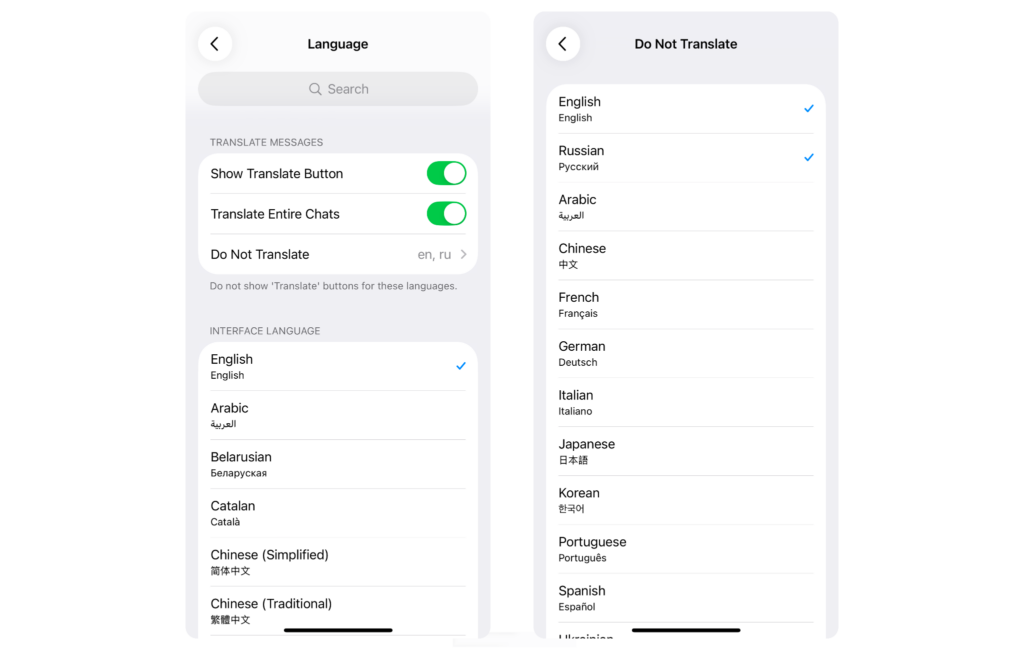
- Open Telegram and go to Settings.
- Select Language.
- Enable Show Translate Button.
- Check the Do Not Translate list and remove any languages you want Telegram to translate.
Telegram uses your language preferences to decide which messages need translating. If Spanish is on your Do Not Translate list, for example, you may not see the Translate option for Spanish messages.
Step 2. Translate a message
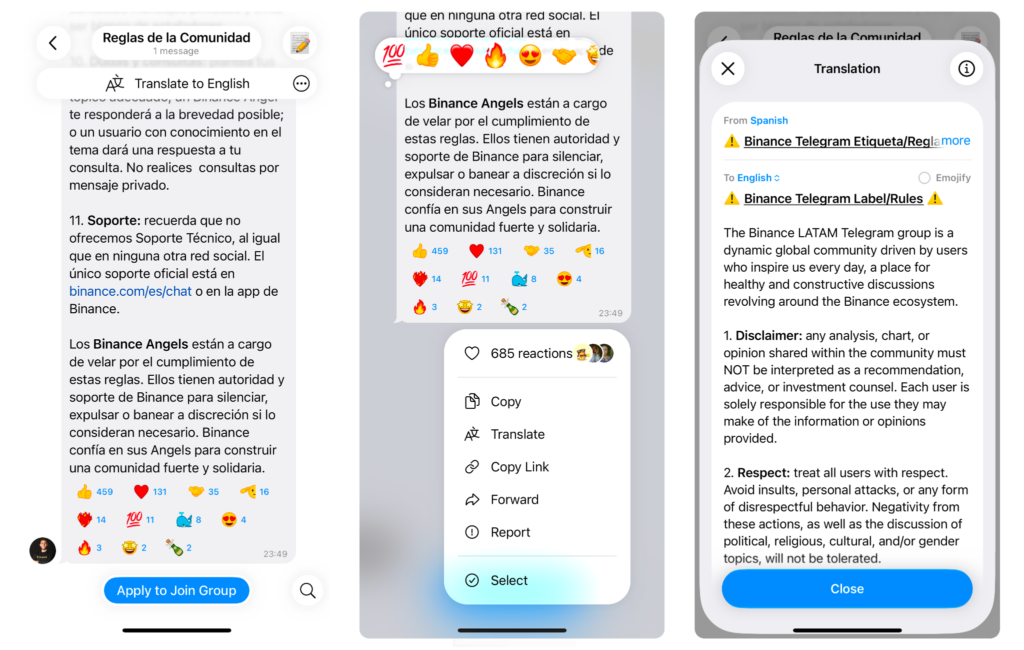
Once the feature is enabled:
- Open any Telegram chat, group, or channel.
- Tap a message on Android, or press and hold it on iPhone.
- Select Translate from the message menu.
- Read the translated text.
Telegram detects the source language and translates the message into your selected language.
You can use the same process for messages in different languages without changing your Telegram interface language every time.
The limitation is that this method works one message at a time. If you’re following an active international group with hundreds of messages, manually translating each one isn’t particularly practical.
Telegram auto-translate: how to enable automatic translation
Telegram Premium supports real-time translation of entire conversations. Instead of selecting individual messages, you can translate a chat and keep reading new messages as they arrive.
This works in private chats, groups, and channels.
To enable automatic translation in Telegram:
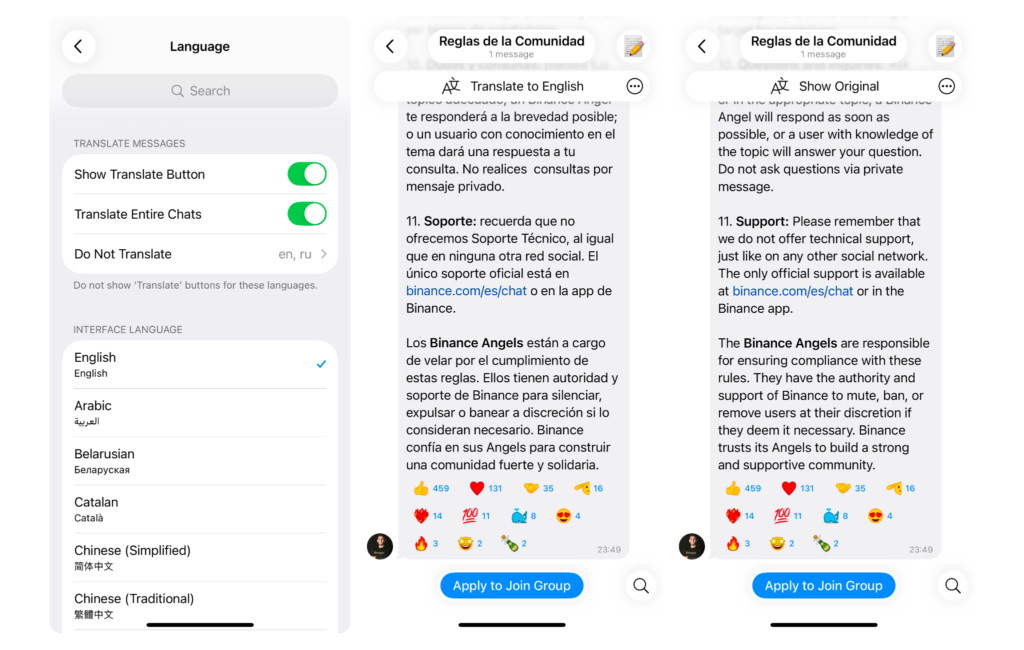
- Open Telegram Settings → Language.
- Enable Translate Entire Chats. This option requires Telegram Premium.
- Open a chat, group, or channel in another language.
- Tap the Translate bar at the top of the conversation.
- Choose the language you want to read the messages in, if prompted.
Telegram will display translated messages in that conversation, including new ones.
You can return to the original text using the translation bar.
Automatic translation vs. translating individual messages
| Feature | Free Telegram | Telegram Premium |
| Translate individual messages | Yes | Yes |
| Translate entire chats | No | Yes |
| Translate group conversations in real time | No | Yes |
| Automatically translate incoming messages | No | Yes |
| Translate channel posts | Individually | Entire channel |
| Requires a third-party bot | No | No |
For occasional translations, the free feature is usually enough. Premium becomes more useful when you regularly participate in foreign-language conversations or follow channels that publish several times a day.
How to translate Telegram group messages
Telegram groups can be harder to follow than private chats because several people may be writing in different languages at once.
There are two ways to handle this.
Option 1. Translate group messages manually
If you don’t have Premium, enable the Translate button and translate the messages you need to understand.
This works well when most of the group communicates in a language you understand and only a few members use another language.
You don’t need permission from the group administrator to use Telegram’s built-in translation feature.
Option 2. Translate the entire group with Premium
If most messages are in another language, enable Translate Entire Chats and use the translation bar at the top of the group.
Telegram can then translate new messages as they arrive, without you having to select each one.
This translation is for your own reading experience. It doesn’t automatically make other group members see your messages in their preferred languages.
For a group that needs multilingual conversations to work for everyone, a translation bot may be a better option.
How to use a Telegram translation bot
A Telegram translate bot is a third-party tool that translates text through a Telegram conversation.
Some bots work in private chats: you forward a message or paste text, and the bot sends back a translation. Others can be added to groups to translate messages according to configured rules.
The exact setup depends on the bot, and not every bot supports automatic group translation.
Translate messages using a bot
For a typical text translation bot:
- Find the bot using its official link or exact Telegram username.
- Open the bot and tap Start.
- Check its instructions for supported languages and commands.
- Send or forward the text you want to translate.
- Read the translation returned by the bot.
Some Telegram translator bots let you specify the target language with a command. Others detect the original language automatically.
An AI-powered Telegram translator can also help explain expressions, slang, or context that a literal translation might miss.
For example, instead of asking only for a translation, you could send:
Translate this message into English. Keep the original meaning and explain any slang or idioms separately.
This is particularly useful for informal conversations, where a word-for-word translation may not make sense.
You can explore AI-powered text tools in the Telegram AI Tools directory.
Add a translation bot to a Telegram group
If you manage a multilingual group, you may want translations to appear directly in the conversation.
The setup typically works like this:
- Choose a translation bot for Telegram that explicitly supports groups.
- Open your Telegram group settings.
- Add the bot as a member.
- Follow its setup instructions to select languages or translation rules.
- Test it with a few messages.
Some bots need permission to read group messages to translate them automatically. Others work only when someone mentions the bot or replies to a message with a command.
Check these permissions before adding a bot. Avoid granting administrator rights unless the bot’s functions genuinely require them.
Telegram translation: built-in translator vs. translation bots
Both methods solve the same basic problem, but they work differently.
| Built-in Telegram translation | Translation bot | |
| Setup | Enable in Telegram settings | Find and configure a bot |
| Individual messages | Supported | Depends on the bot |
| Full-chat translation | Premium feature | Depends on the bot |
| Automatic group translation | Personal view with Premium | Some bots can post translations for members |
| AI explanations and contextual rewrites | Not the primary purpose | Available with some AI bots |
| Privacy | Processed through Telegram’s translation infrastructure | Depends on the bot operator |
| Cost | Free for individual messages; Premium for full chats | Free or paid, depending on the bot |
A translation bot isn’t automatically better. Bots become useful when you need something more specific: posting translations for an entire group, translating into several languages, or getting explanations of unfamiliar phrases.
How to translate your own messages before sending
Translating incoming messages is only half the problem. If you’re speaking to someone who doesn’t understand English, you may also want to translate your replies.
Telegram introduced an AI Editor in March 2026 that can translate text directly in the message field. You don’t need a separate translation bot to use it.
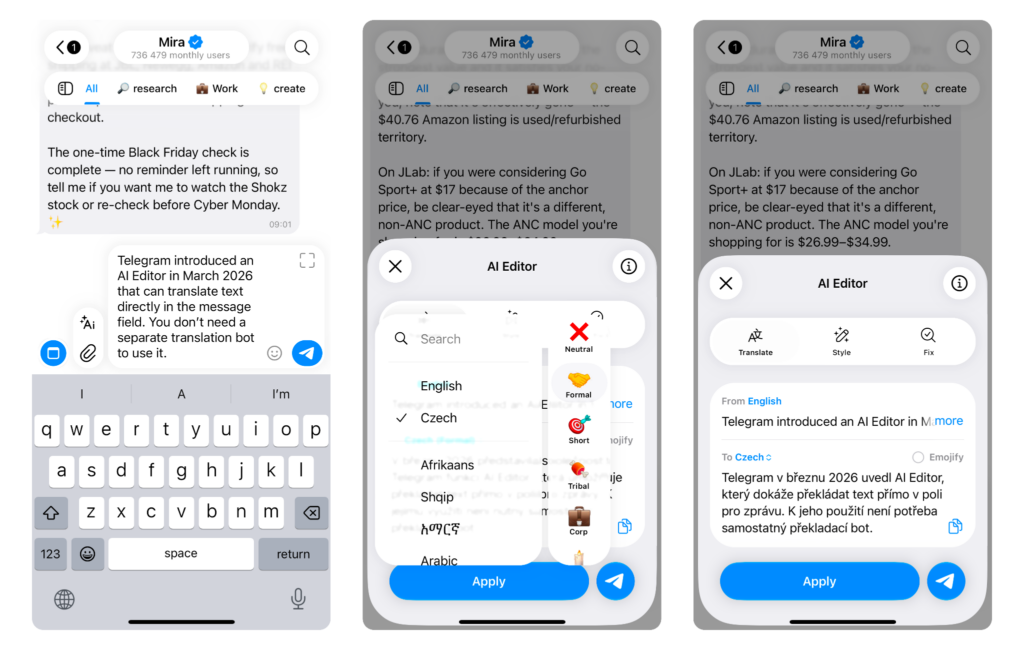
To translate an outgoing message:
- Open a Telegram conversation.
- Type your message in your preferred language.
- Tap the AI Editor icon in the message field.
- Choose the translation option and your target language.
- Review the result before sending.
This is useful for replying to international customers, participating in multilingual communities, or writing to someone who prefers another language.
Unlike automatic chat translation, the AI Editor works on the message you’re composing. It doesn’t translate the entire incoming conversation.
How to auto-translate Telegram channel posts
Telegram also supports automatic translation at the channel level.
This is different from Premium’s personal translation feature. Channel owners can enable auto-translation for their audience, allowing visitors to read posts in their preferred language without needing Premium themselves.
To enable the feature, open your channel’s settings and look for the auto-translation option. Its availability depends on the channel’s boost level.
Once enabled, readers can see translated posts and switch back to the original text using the translation bar.
For group discussions, however, channel auto-translation isn’t a substitute for a multilingual translation bot. Channels and groups have different translation settings.
Telegram Translate button not showing: how to fix it
Sometimes Telegram doesn’t display the Translate button, even when the message is clearly written in another language.
Before installing a third-party Telegram translator, check a few common causes.
1. The Translate button is disabled
Go to Settings → Language and confirm that Show Translate Button is enabled.
If you’ve recently updated Telegram or switched devices, check the setting again.
2. The language is excluded from translation
Open the Do Not Translate list in Telegram’s language settings.
If the language of the incoming message appears there, remove it and try again.
For example, if you want to translate Telegram messages from Russian to English, make sure Russian isn’t excluded.
3. You’re trying to translate an entire chat without Premium
Individual message translation is free. Translating an entire chat in real time is a Premium feature.
If the Translate option appears on individual messages but you can’t find the full-chat translation bar, check your subscription and Translate Entire Chats setting.
4. You’re using an outdated Telegram app
Update Telegram through your device’s official app store or the Telegram website.
Features and menu layouts can differ between Android, iOS, desktop, and third-party Telegram clients. The official app is the most reliable place to check whether a translation feature is supported.
5. Telegram isn’t detecting the language correctly
Very short messages, mixed-language text, slang, and abbreviations can make language detection unreliable.
If the built-in translator doesn’t recognize a message, try copying it into an AI chatbot and specifying both the source and target languages.
Is Telegram translation private?
Privacy depends on which translation method you use.
For Telegram’s built-in translation and AI Editor, Telegram says processing runs through its Cocoon infrastructure rather than sending content to external AI providers.
Third-party translation bots are different. When you send text to a bot, its operator may receive and process that text using its own systems or external translation providers.
For private conversations, work discussions, and sensitive information, check where the translation happens before choosing a service.
The bottom line
If you only need to translate a few Telegram messages, start with the built-in Translate button. It’s free, requires little setup, and works across private chats, groups, and channels.
For conversations that happen mostly in another language, Telegram Premium’s automatic translation is more convenient. And if you’re managing a multilingual group or need contextual explanations, a translation bot or AI chatbot may offer more flexibility.
The main thing to check before adding another tool is whether Telegram already does what you need. For most everyday translation tasks, it does.
You can also explore the Telegram AI Tools directory to find AI-powered bots for translation, writing, and other messaging tasks.
FAQ
Open Telegram Settings → Language and enable Show Translate Button. Then tap or press and hold a message in a foreign language and select Translate. This feature is free and works in private chats, groups, and channels.
If you’re wondering how to translate Telegram messages into English, set English as your preferred language in Telegram’s language settings, enable Show Translate Button, and select Translate on a message. If the translation option doesn’t appear, check that the source language isn’t on your Do Not Translate list.
Go to Settings → Language and enable Show Translate Button. Telegram Premium users can also enable Translate Entire Chats to translate incoming messages automatically.
Yes. Telegram Premium supports automatic translation of entire chats, groups, and channels, including new messages as they arrive. Individual message translation is available to free users.
You can translate individual group messages for free, but Telegram’s built-in real-time translation of an entire group requires Premium. Some third-party bots offer group translation features, though availability, pricing, and permissions depend on the provider.
There isn’t one bot that’s best for every situation. A simple translation bot may be enough for occasional messages, while a multilingual group needs a bot that supports group conversations and configurable translation rules. For contextual translations and explanations, an AI-powered chatbot may be more useful.
Before choosing one, check supported languages, group compatibility, pricing, privacy practices, and whether the bot is actively maintained.
Yes. Telegram’s built-in features support translation between different languages. For translation into multiple target languages at the same time, you may need an AI translation bot or another third-party tool with that specific capability.
Telegram’s regular text Translate button isn’t a direct voice-message translator. Voice messages generally need to be transcribed into text before translation. Telegram offers voice-to-text transcription subject to account limits, and some AI bots can handle transcription and translation as part of the same workflow.