












One of the best things about Telegram stickers is that anyone can make their own. A photo of your dog, an inside joke from a group chat, or an AI-generated character can become a sticker that your friends use in everyday conversations.
Telegram has a built-in sticker maker that lets you turn photos into stickers without downloading another app. You can also use Telegram bots, AI image generators, and external editing tools to create more elaborate sticker designs.
This guide explains how to make Telegram stickers, organize them into custom sticker packs, create animated stickers, and share them with other users.
3 ways to make Telegram stickers
The easiest method depends on whether you already have an image or want to create something from scratch.
| Method | Best for | Difficulty |
| Built-in Telegram Sticker Editor | Turning photos and memes into stickers | Easy |
| Official @Stickers bot | Uploading prepared artwork and managing sticker packs | Easy |
| AI sticker maker or image generation bot | Creating original characters, illustrations, and themed stickers | Easy to moderate |
You don’t need Telegram Premium to create, share, or use regular custom stickers. Telegram’s sticker platform is available to all users.
How to make stickers on Telegram using the built-in editor
The built-in Telegram sticker maker simplifies this process. You can select a photo, remove its background, add text, and turn it into a sticker directly inside a conversation.
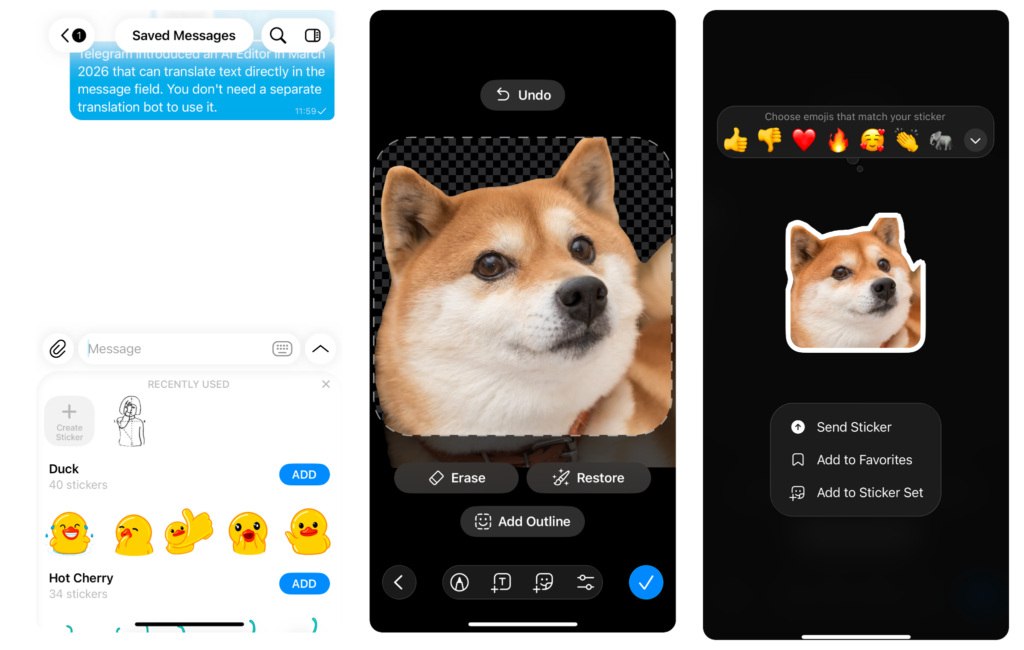
Step 1. Open the Telegram Sticker Editor
- Open any Telegram chat.
- Tap the emoji icon next to the message field.
- Switch to the sticker panel.
- Tap the + button.
- Select an image from your device.
You can use a photo, screenshot, illustration, or an image you’ve generated with AI.
Step 2. Edit your sticker
The Telegram Sticker Editor includes several tools for customizing your image:
- Automatic background removal.
- Manual erasing and restoration of image areas.
- Outlines around objects and characters.
- Text and drawings.
- Existing stickers and emojis as decorative elements.
For example, you can select a photo of your dog, remove everything around it, add a white outline, and turn it into a reaction sticker.
You don’t need to resize the image or convert it into a specific file format beforehand when using the built-in editor.
Step 3. Save and send your sticker
Once you’re happy with the design, you can send the sticker directly to the conversation or add it to a sticker pack.
Telegram can also suggest emojis that match your sticker. These emojis work as shortcuts: when you type a matching emoji in a conversation, Telegram can suggest the associated sticker.
For occasional stickers made from photos or memes, the native editor is usually all you need.
How to make a sticker pack on Telegram
A Telegram sticker pack is a collection of stickers that users can add to their sticker panel and reuse across conversations.
Instead of sending individual images every time, you can create a pack around a particular character, theme, community, or set of reactions.
To create a sticker pack using Telegram’s built-in editor:
- Create your first sticker using the Sticker Editor.
- Select the option to add it to a sticker set.
- Create a new set and give it a name.
- Associate the sticker with one or more relevant emojis.
- Repeat the process for additional stickers, selecting your existing pack each time.
You can also add existing Telegram stickers to your custom collections. This is useful if you want to organize your favorite reactions in one place rather than create every sticker yourself.
A good sticker pack doesn’t necessarily need dozens of designs. A collection of eight to ten stickers covering common reactions, such as excitement, confusion, disappointment, agreement, and laughter, is a good starting point.
How to create Telegram stickers using the @Stickers bot
Telegram has an official sticker bot, @Stickers, for creating and managing sticker packs.
The bot also offers a Mini App interface and supports text commands. It is particularly useful when you already have artwork prepared in another application or want to publish animated and video stickers.
Unlike Telegram’s built-in editor, @Stickers primarily helps you upload, publish, and organize sticker files rather than design them from scratch.
Creating a sticker pack with @Stickers
- Open @Stickers in Telegram and tap Start.
- Open the sticker management interface or use the /newpack command for a static sticker pack.
- Choose a name for your pack.
- Upload your first sticker image as a file.
- Assign an emoji that represents the sticker.
- Repeat for the remaining images.
- Follow the publishing instructions to generate a shareable sticker pack link.
You can return to @Stickers later to manage your published collections and view usage statistics.
Telegram sticker file requirements
If you’re preparing your stickers outside Telegram, make sure the files meet the platform’s technical requirements.
| Requirement | Static stickers | Animated stickers | Video stickers |
| File format | PNG or WEBP | TGS | WEBM |
| Dimensions | One side 512 px, the other 512 px or less | 512 × 512 px | One side 512 px, the other 512 px or less |
| Maximum file size | 512 KB | 64 KB | 256 KB |
| Maximum duration | — | 3 seconds | 3 seconds |
| Frame rate | — | 60 FPS | Up to 30 FPS |
Static stickers should have a transparent background. Video stickers must use the VP9 codec and contain no audio track.
How to make custom Telegram stickers with AI bots
Telegram’s native editor works well when you already have an image. But what if you want to create a cartoon version of yourself, design a character for your community, or make an entire sticker pack in a consistent visual style?
An AI-powered Telegram sticker creator can generate original artwork from a text description or reference photo. You don’t need drawing skills or experience with graphic design software.
Here are two AI tools from our directory that you can use to create custom stickers.
Mira
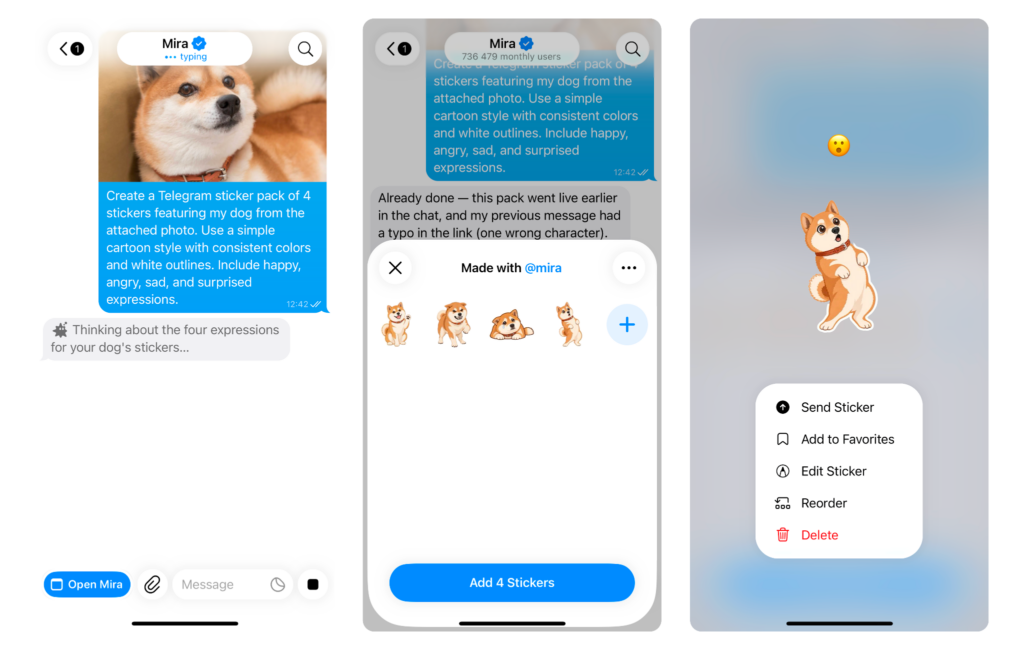
Mira is a personal AI agent for Telegram with image generation, photo editing, and dedicated sticker creation capabilities.
Unlike a general image generator, Mira can create custom Telegram stickers and complete sticker packs directly inside the conversation.
To make stickers with Mira:
- Open @mira in Telegram.
- Upload a reference photo or describe the character you want to create.
- Specify the visual style, expressions, and number of stickers.
- Review the generated stickers and request changes if needed.
- Follow the instructions to add the pack to Telegram.
Here’s an example of a prompt:
Create a Telegram sticker pack of 4 stickers featuring my dog from the attached photo. Use a simple cartoon style with consistent colors and white outlines. Include happy, angry, sad, and surprised expressions.
You can also create stickers from scratch without uploading a reference image. This is useful for designing original characters, community mascots, or branded stickers.
Mira is particularly useful when you want a Telegram sticker pack maker that handles both image generation and pack creation.
SYNTX.AI
SYNTX.AI provides access to multiple AI image and video generation models through a single Telegram bot.
You can use models such as Nano Banana to turn photos into stylized illustrations or generate original sticker designs from text prompts.
To create stickers with SYNTX.AI:
- Open @syntxaibot.
- Select an image generation model.
- Upload a reference image or enter a text prompt.
- Generate and save the sticker designs.
- Use Telegram’s built-in Sticker Editor or @Stickers to assemble and publish your pack.
For example, you could use the following prompt:
Create six cartoon reaction stickers featuring a small orange cat. Use thick white outlines, expressive faces, consistent character design, and a plain background that is easy to remove.
Explore more AI image generation bots for Telegram in our directory.
How to make animated stickers for Telegram
Telegram supports two types of moving stickers: vector-based animated stickers and video stickers.
They may look similar in a conversation, but they use different file formats and require different tools to create.
Vector-based animated stickers
Traditional Telegram animated stickers use the TGS format. These stickers are lightweight and can display smooth animations without requiring large files.
Creating them typically involves Adobe After Effects and the Bodymovin-TG export plugin.
The process involves:
- Designing a character or illustration using vector graphics.
- Animating it in Adobe After Effects.
- Exporting the animation in TGS format.
- Uploading the file through @Stickers.
- Adding it to a sticker pack.
This method offers precise control over animations but requires some experience with animation software.
Video stickers
Video stickers are an easier alternative if you don’t work with vector graphics.
You can create a short animation using a video editor or an AI video generation tool, convert it into Telegram’s supported WEBM format, and upload it through @Stickers.
For example, you could generate an illustration of a cat using AI and then animate it to make the cat wave, blink, or laugh.
Keep the animation short, make the movement easy to recognize, and ensure the final video meets Telegram’s file size and format requirements.
An AI-generated video isn’t automatically a Telegram-compatible sticker. You may still need to resize, compress, or convert the file before uploading it.
How to share a Telegram sticker pack
Once you’ve created your sticker pack, you can share it with anyone on Telegram.
There are two main ways to do this.
Share an individual sticker
Send any sticker from your custom pack to a private chat, group, or channel.
Other users can tap the sticker to open the full collection and add it to their own sticker panel.
This is the easiest way to share stickers naturally through everyday conversations.
Share a sticker pack link
Every published Telegram sticker pack has its own shareable link, typically in the following format:
https://t.me/addstickers/YourStickerPackName
You can copy the link and share it in Telegram channels, on social media, or on your website.
Anyone who opens the link can preview the collection and add it to their Telegram account.
For creators and businesses, this is also a simple way to distribute branded stickers without asking people to download individual image files.
How to add stickers to Telegram
You don’t need to create your own stickers to build a personalized sticker collection.
If someone sends you a sticker you like:
- Tap the sticker in the conversation.
- Open the associated sticker pack.
- Select Add Stickers.
The collection will appear in your sticker panel, ready to use in other conversations.
You can also add sticker packs directly through their shareable links.
To organize or remove packs, open Telegram’s sticker settings. Depending on your device, these settings may appear under Stickers and Emoji or within your chat settings.
The bottom line
If you want to make a sticker from an existing photo or meme, start with Telegram’s built-in Sticker Editor. It’s free, easy to use, and doesn’t require additional software.
If you already have prepared artwork or want to create animated stickers, use the official @Stickers bot.
And if you want to design original characters, turn yourself into a cartoon, or generate an entire themed sticker pack, an AI-powered Telegram sticker maker such as Mira or SYNTX.AI can simplify the creative process.
The right tool depends on whether you need to edit an existing image, generate new artwork, or publish a complete sticker collection.
FAQ
Open any Telegram conversation, switch to the sticker panel, and tap the + button. Select a photo, remove its background, customize the design, and save it as a sticker. Telegram’s built-in Sticker Editor is free to use.
@Stickers is Telegram’s official bot for creating, publishing, and managing sticker packs. It supports static, animated, and video stickers.
Open the built-in Sticker Editor and select a photo from your device. Use automatic background removal to isolate the person or object, add an outline or text if needed, and save the result.
Use an AI image generation bot such as Mira or SYNTX.AI. Upload a reference photo or describe your sticker design in a prompt. Depending on the tool, you can publish the stickers directly or assemble the pack using Telegram’s built-in editor.
Create your first sticker using the native editor and select the option to add it to a new sticker set. Give the pack a name and add more stickers to the same collection. You can also create and publish packs through @Stickers.
Create an animation in TGS format or a short video in WEBM format. Make sure the file meets Telegram’s technical requirements, then upload it through @Stickers and add it to a sticker pack.
Open the sticker pack link and tap Add Stickers. The entire collection will become available in your Telegram sticker panel.
No. Creating, publishing, sharing, and using regular custom Telegram stickers is available to free users. Third-party AI sticker generators may have their own pricing and generation limits.
Yes. Anyone you send a sticker or sticker pack link to can add the collection to their account and use it in other conversations.